
The Deity SRD mini is a compact radio frequency (RF) splitter for professional UHF wireless. Built around the latest ultra-low noise figure and high-linearity RF amplifiers, it operates across the 470MHz to 1GHz range and acts as a band-pass filtered UHF signal splitter, letting you feed a single pair of antennas into multiple wireless receivers. This guide covers what the SRD mini does and the parts of the unit.
What the SRD Mini Does
On a busy set you often run several receivers at once, for example multiple THEOS D2RX receivers. Rather than giving each one its own set of antennas, the SRD mini takes the signal from a single antenna pair (channels A and B) and cleanly distributes it to up to four RF outputs per side. This reduces antenna clutter, keeps your RF front end consistent, and adds gain and band-pass filtering to help your receivers hold a solid link.
- Frequency range: 470MHz to 1GHz
- Gain: +3 to +9 dB with ultra-low noise figure (less than 1.5 dB)
- Inputs: two BNC RF inputs (A and B)
- Outputs: SMA RF outputs for connecting to your receivers
- Active antenna support: can supply power to an active antenna when needed
Get to Know Your SRD Mini
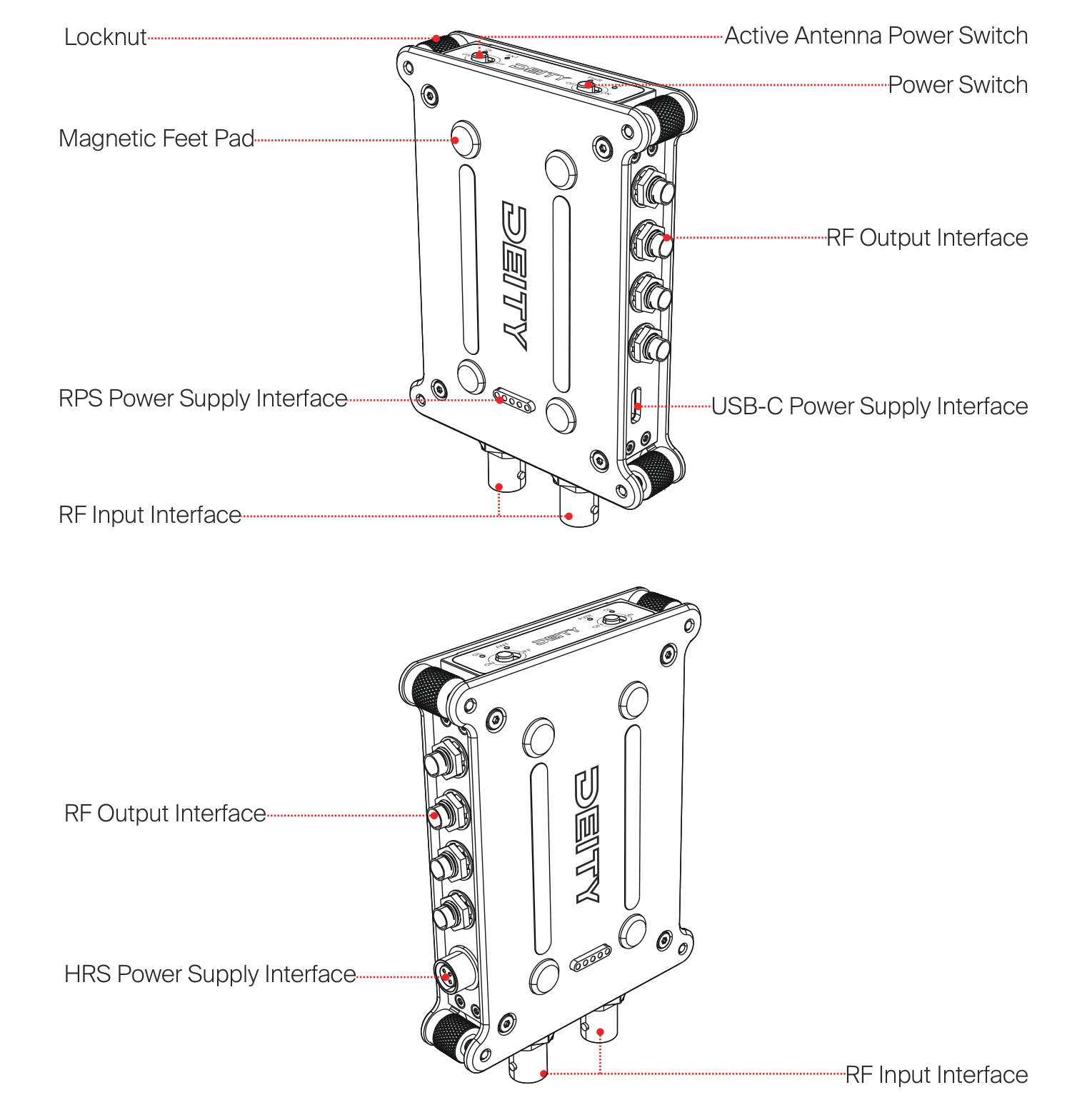
Working around the body of the SRD mini, the main features are:
- Power Switch: turns the unit on and off.
- Active Antenna Power Switch: sends power out to an active antenna when it is switched on.
- RF Input Interface (A and B): two BNC connectors on the bottom of the body that accept the incoming antenna signal.
- RF Output Interface: SMA connectors along the side that feed your receivers.
- USB-C Power Supply Interface: powers the unit from a USB-C source.
- HRS Power Supply Interface (DC IN 12V): a 4-pin locking connector for DC power.
- RPS Power Supply Interface: a pogo-pin contact set that draws power directly from a stacked Deity SPD mini power distributor.
- Magnetic Feet Pad: lets you mount the unit to a magnetic surface.
- Locknut: secures the RF output connectors.
The top panel carries the two switches and the status LEDs. For a full breakdown of the switches and the light display, see [SRD-Mini] Controls & Indicators.
Next Steps
- [SRD-Mini] Setup & Connections - power the unit, connect your antennas and receivers, and mount it.
- [SRD-Mini] Controls & Indicators - understand the switches and status lights.
- [SRD-Mini] Specifications - full technical data.