The VO-7U is a plug-and-play USB microphone, so there are no drivers to install. Mount it on the included boom arm or tripod, connect it with the right USB cable for your device, and plug your headphones into the mic for latency-free monitoring. This guide covers connecting to a PC or Mac, connecting to a mobile device, using the tripod, and cleaning the capsule.
Installation and Use
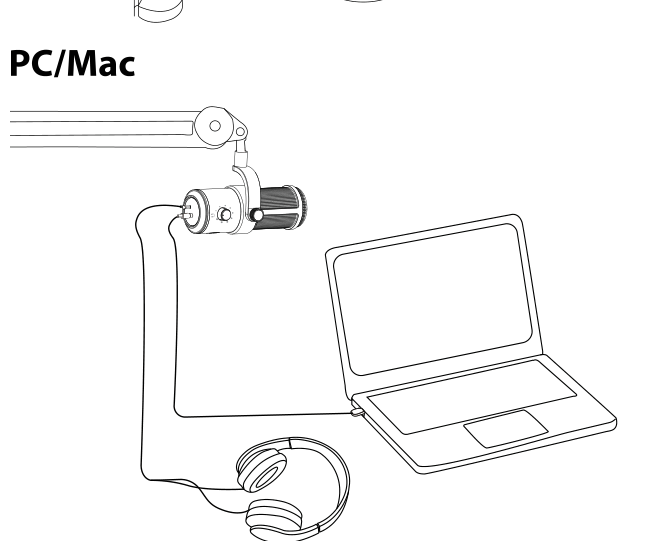
Mount the VO-7U on the boom arm stand (included with the USB Podcast Kit) or on the included tripod, then run the correct USB cable from the microphone's USB-C Port to your device:
- Use the USB-A to USB-C cable for computers with a standard USB-A port.
- Use the USB-C to USB-C cable for computers and mobile devices with a USB-C port.
For monitoring, plug your headphones into the 3.5mm Headphone Output on the microphone. See [VO-7U] Hardware & Controls for how the volume and monitoring source are selected.
PC / Mac
Connect the VO-7U to your computer with the appropriate USB cable. The microphone draws power over USB and is recognized automatically as an audio device, no drivers required. Select the VO-7U as your input (and, if you like, your output) device in your operating system's sound settings or in your recording software.
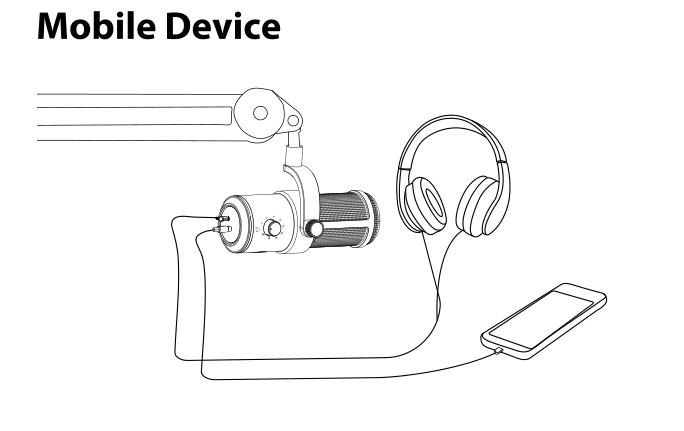
Mobile Device
Connect the VO-7U to a phone or tablet using the USB-C to USB-C cable. Plug your headphones into the microphone's headphone output to monitor while you record.
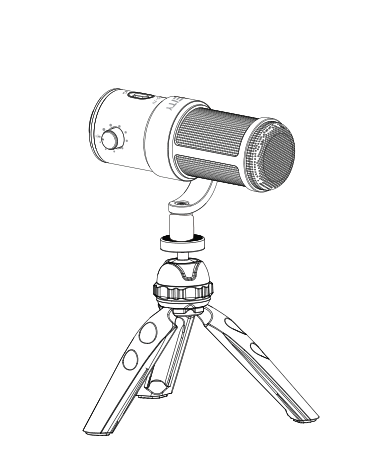
Tripod
For desktop use, mount the VO-7U on the included tripod. The microphone mounts natively on 3/8 inch and 5/8 inch female threads, and the included thread adapter lets it fit a range of stands and arms.
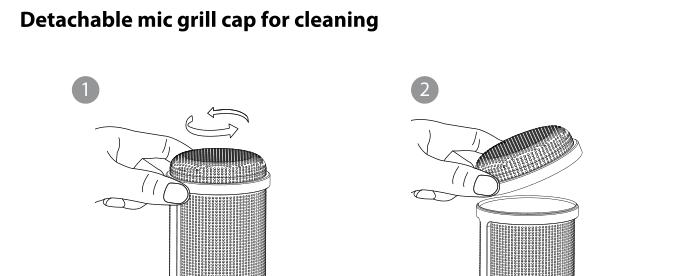
Cleaning the Capsule
The mic grill cap is detachable for cleaning. Twist the grill cap counterclockwise to unlock it, then lift it off to expose the capsule. Clean the grill, then align and twist it back on to lock it in place.