
Every control you need to record, monitor, and personalize your VO-7U sits on the body of the microphone. This guide walks through each knob, button, and port, then covers the mute function and the twelve built-in RGB LED presets.
Functions
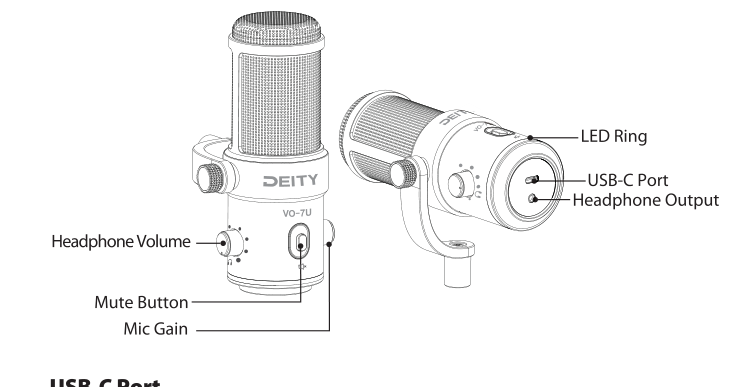
USB-C Port
A standardized USB-C port for connecting to a PC, Mac, or mobile device, which supplies power to your microphone.
Headphone Output
A 3.5mm output used to monitor the audio directly from the microphone or from your PC, Mac, or mobile device.
Headphone Volume Knob
Rotate the knob to adjust the volume in your headphones. Press the knob in to switch between listening directly to your microphone and listening to your USB device's audio.
Mic Gain Knob
Rotate the knob to adjust the sensitivity of your microphone. Long-press the knob to activate the LED ring. Short-press to switch between the 12 LED presets.
Mute Button
Press the button to mute the microphone. The LED ring will flash red when muted. Press again to deactivate, and the LED ring will return to its previous setting.
12 LED Presets
Your mic is equipped with twelve custom LED presets. The LED ring is off by default. Long-press the Mic Gain Knob to turn the LED ring on and off, and short-press it to switch between presets. After first use, the VO-7U will boot up with your last LED preset. Long-press the Headphone Volume Knob to adjust the brightness of the LED ring.
| Preset Order | RGB Color / Effect |
|---|---|
| 1 | 360° RGB Slowly Spinning |
| 2 | RGB Slow Wave |
| 3 | White |
| 4 | Purple |
| 5 | Red |
| 6 | Candle Effect |
| 7 | Yellow |
| 8 | Neon Green |
| 9 | Ocean Waves |
| 10 | Cyberpunk Pink |
| 11 | Breathing Light Effect |
| 12 | Heart-Shaped Waterfall |