
This guide covers the physical controls of the TC-SL1: the function control wheel, the on/off switch, the two hot-swap battery bays, the front screen flip switch, and how to charge the slate. Once you know these, you are ready to move through the menus and start syncing timecode.
Function Control Wheel
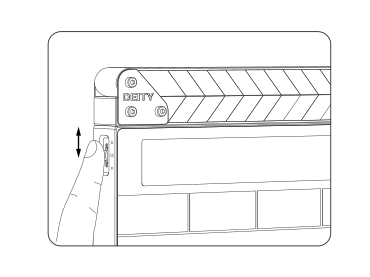
The function control wheel drives the entire menu:
- Rotate back and forth to move between options.
- Short-press to enter the highlighted item.
- Long-press to return to the previous screen or menu item.
On/Off Switch
Slide the switch cover up, then toggle the switch up or down to turn the TC-SL1 on or off.
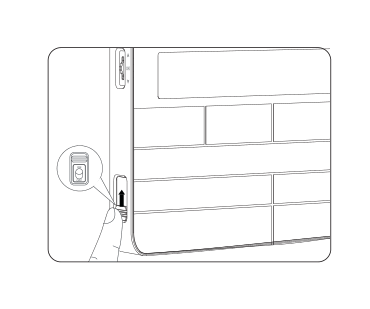
Battery Compartments (A and B)
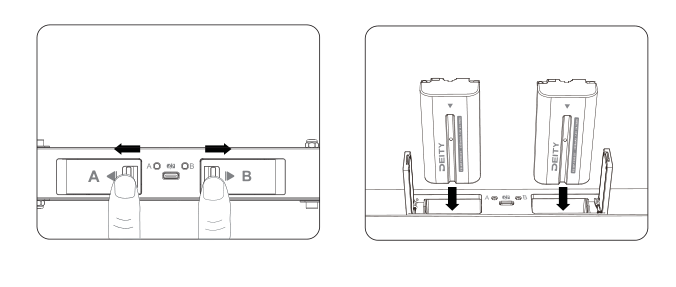
The TC-SL1 has dual NP-F battery bays, labeled A and B. To swap a battery, unlock the compartment slider and the battery will pop out. Insert the new battery, close the cover, and push it down to secure it.
Because the slate runs on two batteries, you can hot-swap one bay at a time without powering down. Install two FB-NP-F550-DT rechargeable batteries (both included) for continuous operation.
Front Screen Flip Switch
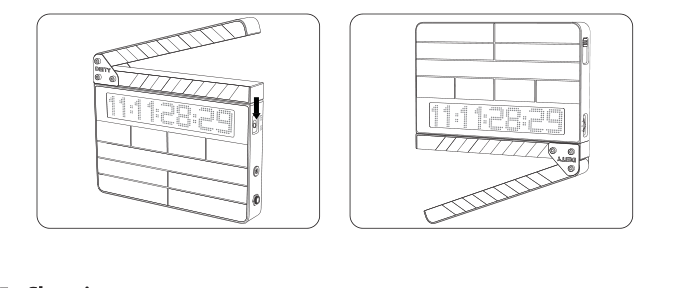
Toggle the front screen flip switch and the display rotates 180 degrees, letting you slate upside down for a tail slate.
Charging
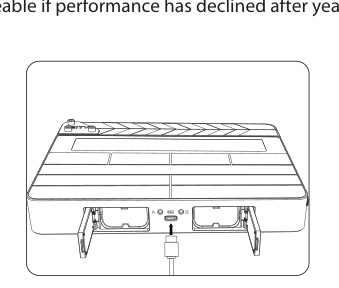
The TC-SL1 charges both installed batteries through the USB Type-C port. Connect the included Type-C charging cable to a DC adapter (adapter not included). The slate supports PD3.0, QC2.0, FCP, and AFC quick-charging protocols. For the fastest charging, use a charger rated for 15V / 2A output.
Power LED Behavior
- The power LED glows green when the battery is in the clear.
- The color changes to red when there is less than about 20% battery life left.
- While charging, the power LED flashes between red and green.
- When fully charged, the power LED stays green.
Note: Charging at temperatures below 10 degrees Celsius will damage the battery. The battery is replaceable if performance has declined after years of use.