
Once the SPD-1 is powered from a battery or USB-C source, you control its outputs with two locking switches and monitor everything on the built-in color display. This guide covers the power switches, the smart fuel gauge home screen, the overload warning, and how the display changes for different power inputs.
Power Switches
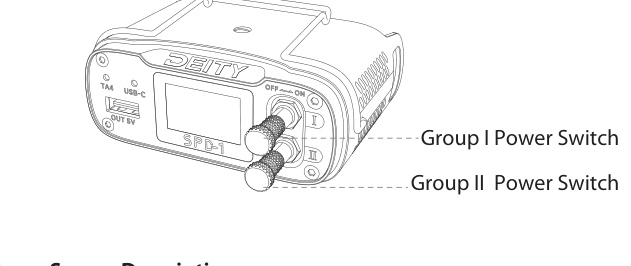
The SPD-1 has two locking toggle switches:
- The Group I Power Switch enables the Group I power outputs.
- The Group II Power Switch enables the Group II power outputs.
Each switch is a pull-and-toggle lock: pull the switch out and toggle it right or left to enable or disable the outputs for that group. The locking action prevents an output group from being switched off by accident.
Home Screen: Smart Fuel Gauge
The color display shows all the information you need about the state of charge of your batteries. When the SPD-1 is connected to smart batteries, the micro controller communicates with each battery and retrieves its full state of charge, then displays it on the home screen. If a non-smart battery is connected, only that battery's voltage is displayed.
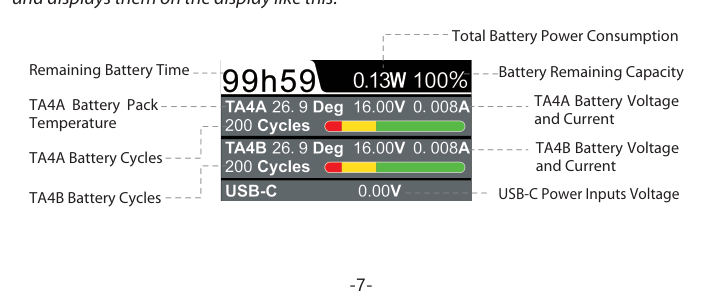
The home screen reads as follows:
- Remaining Battery Time (top left, for example 99h59)
- Total Battery Power Consumption (top center, in watts)
- Battery Remaining Capacity (top right, as a percentage)
- TA4A Battery Voltage and Current
- TA4A Battery Pack Temperature (in degrees) and TA4A Battery Cycles
- TA4B Battery Voltage and Current
- TA4B Battery Pack Temperature and TA4B Battery Cycles
- USB-C Power Input Voltage (bottom row)
Overload Warning Display
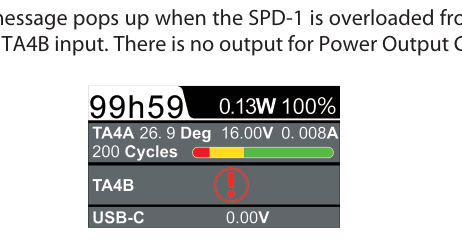
A warning icon pops up on the display when the SPD-1 is overloaded from either the TA4A and/or TA4B input. While the overload is active, there is no output for Power Output Group I and Group II. Reduce the total load on the affected input to clear the warning and restore output.
Home Screen Responses to Different Power Inputs
The display adapts to how the SPD-1 is being powered, so you can tell at a glance what is feeding it.
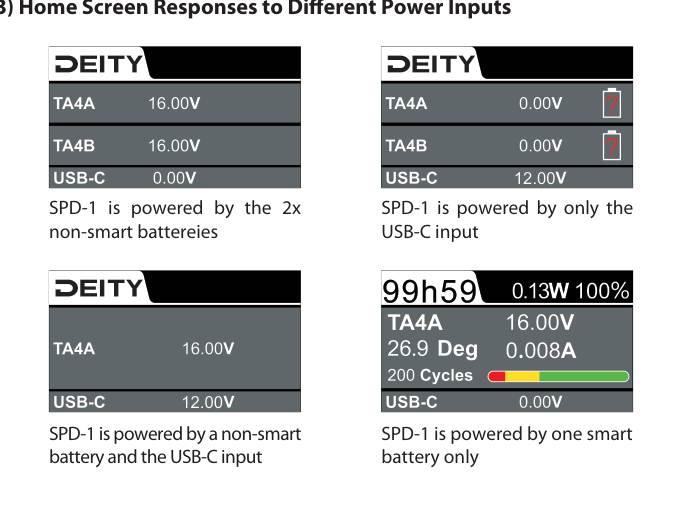
- Two non-smart batteries: only the voltage of each battery is shown (TA4A and TA4B).
- USB-C input only: the TA4 inputs read 0.00V and the USB-C voltage is shown.
- A non-smart battery and the USB-C input: the battery voltage and the USB-C voltage are shown together.
- One smart battery only: the full fuel gauge is shown, including voltage, current, temperature, cycles, remaining time, and remaining capacity.