The Deity Connect Deluxe Kit is flexible because the BP-TRX can take on several roles and the DUO-RX can output audio in several ways. This guide explains the BP-TRX operating modes, the DUO-RX output modes, internal recording, timecode, and how to run two kits together with the sync cable. For the full menu reference and every individual setting, see the BP-TRX articles linked at the end.
BP-TRX Operating Modes
Short press MENU/SEL and open TRX Mode to select how the unit works. There are seven modes:
| Mode | What it does |
|---|---|
| TX+REC | The default kit mode. The BP-TRX transmits to the DUO-RX and records internally at the same time. Pressing REC on the unit (or on a paired BP-TRX or HD-TX) starts and stops recording. Pre-jammed timecode is stamped into the WAV header, and the USB port outputs digital audio. |
| RX MODE | The BP-TRX acts as a receiver, pairing with a BP-TX, HD-TX, or Pocket-TX. The REC button controls the recorder on the paired transmitter, and the transmitter can be controlled through the receiver menu. |
| MASTER TX | Pairs with up to four BP-TRX units set to IEM or Camera Hop mode. Internal recording on the Master TX can be used at the same time, and pre-jammed timecode is stamped into the WAV header. |
| IEM MODE | In-Ear Monitor. The unit pairs with a BP-TRX set to Master TX and receives the audio. Up to four units can be paired to one Master TX. |
| CAMERA HOP | Pairs with a BP-TRX set to Master TX and receives its audio. Up to four units can be paired to one Master TX. The output can combine timecode and audio, or be audio only. |
| TC BOX | The unit works as a stand-alone timecode device. Audio input supports timecode-in for jam syncing, and the audio output can output the timecode. |
| REC ONLY | A stand-alone recorder with no wireless link. Pre-jammed timecode is stamped into the WAV header, and the USB port outputs digital audio. |
For the kit as shipped, set both BP-TRX units to TX+REC MODE and pair them to the DUO-RX.
DUO-RX Output Modes
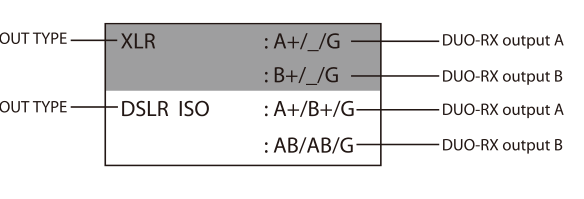
The DUO-RX pairs with up to two BP-TRX units, shown as TX-A and TX-B. It has six output modes, selected with the OUT TYPE option in the receiver menu:
- XLR: Use with the included 3.5mm TRS to 3-pin XLR audio cable. RX Output A outputs TX-A (mono) and RX Output B outputs TX-B (mono).
- DSLR ISO: Outputs a stereo, two-channel signal over the 3.5mm locking TRS to TRS coiled audio cable.
- SOLO A: Both Output A and Output B provide a mono signal of TX-A.
- SOLO B: Both Output A and Output B provide a mono signal of TX-B.
- HOP A: RX Output A provides a stereo signal of TX-A, and Output B provides a mono signal of TX-A.
- HOP B: RX Output A provides a mono signal of TX-B, and Output B provides a stereo signal of TX-B.
Press the DUO-RX Up or Down button to start or stop the recorder on the paired TX-A and TX-B units.
Recording to microSD
Insert a microSD card into the BP-TRX, then short press REC/STOP to start or stop recording in TX+REC or REC ONLY mode. Short press PAUSE/PLAY to play back or pause a recorded file.
- Maximum card size: 128GB, microSD, formatted FAT32 or exFAT.
- Max file size: 2GB. The unit automatically keeps recording and creates a new file when the limit is reached.
- File type: 24-bit/48kHz uncompressed PCM WAV.
Timecode
Every BP-TRX has an internal crystal-based timecode generator, available in TX+REC, RX MODE, MASTER TX, CAMERA HOP, TC BOX, and REC ONLY modes. The oscillator holds an accuracy of about +/- 0.5 ppm, roughly one frame per 24 hours, and timecode keeps running for six hours after the unit is powered down. Timecode can be jammed to or from cameras, recorders, other BP-TRX units, and third-party devices using the included timecode sync and audio cable.
The BP-TRX supports four timecode modes (Off, Int Free Run, Int Rec Run, Int RTC Run) plus frame-rate and jamming options. For the full timecode setup walkthrough, see the BP-TRX timecode article below.
Using Two Kits Together (Sync Cable)
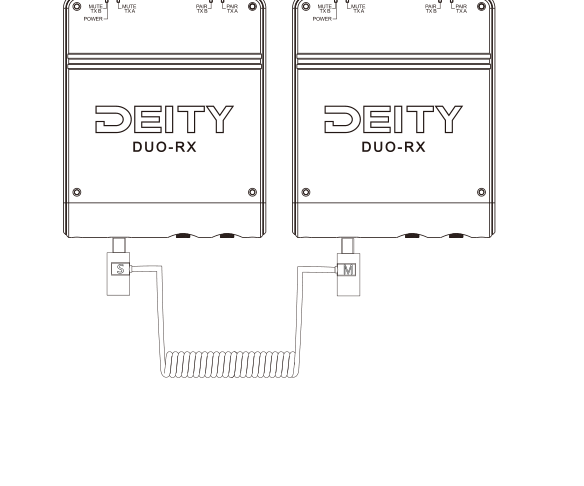
When two Deity Connect Deluxe Kits are used at close range, connect the two DUO-RX receivers with the included sync cable. Synchronizing the receivers reduces co-channel interference and maximizes transmission distance. To keep the link stable, two DUO-RX units paired to four BP-TRX units is the advised maximum.